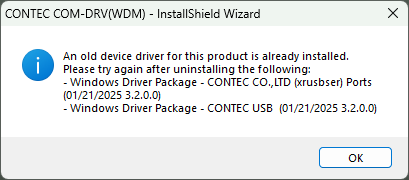
In the case of "COM-DRV for COM-4xx-USB" was installed
An older version of the serial communication driver is already installed.
Uninstall the installed serial communication driver, and then install it
again.
In the case of "COM-DRV for COM-4xx-USB" was installed
The way to uninstall depends on the installed the serial communication driver version.
Serial communication driver |
The way to uninsstall |
COM-DRV(WDM) Ver.10.00 or later |
Please refer to [Setup Driver Environment]-[Modify and Uninstall]-[Uninstall] topic. |
Windows Serial Communication Driver Ver.9.20 or earlier |
Please refer to "Uninstall for Old version (Board)" topic. |
Windows COM-DRV for COM-1xx(USB)H Ver.3.10 or earlier Windows COM-DRV for COM-4xx-USB Ver.3.10 or earlier |
Please refer to "Uninstall for Old version (USB)" topic. |
Windows Virtual COM Driver Ver.4.70 or earlier |
Please refer to "Uninstalling Virtual COM Driver for Old version" topic. |
Serial Communication Media Converter Softwaer Jan.2025 or earlier |
Please refer to "Uninstall Serial Communication Media Converter for Old version" topic. |