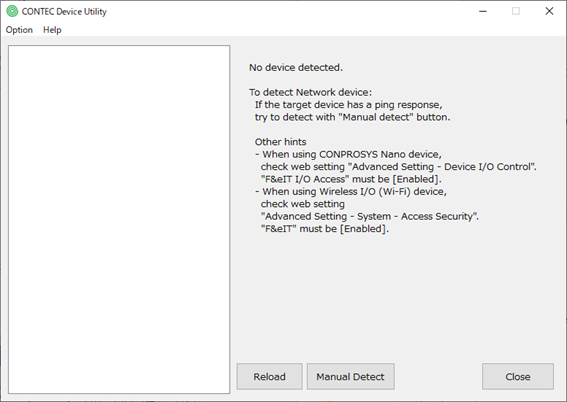
There are several possible causes.
1. The environment is not set up to detect Ethernet devices.
Multicast communication is required to detect
CONTEC's Ethernet devices.
Additionally, manual installation of "XXX-NET-TYPE1" is also
necessary.
Please refer "The connected Ethernet device does not appear in the utility" topic to know more details.
2. The F&eIT protocol is not enabled.
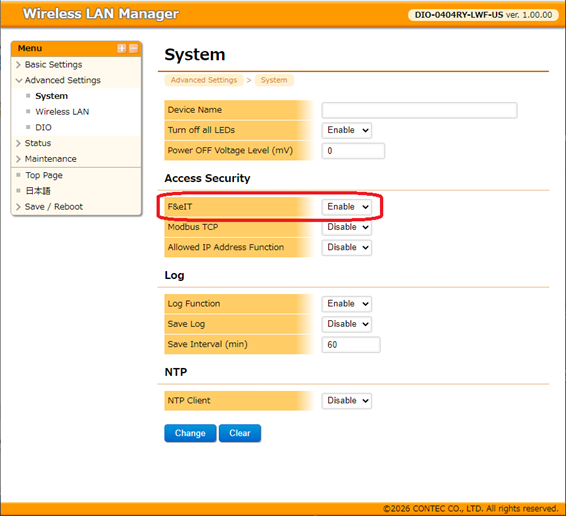
If you are using a wireless I/O (Wi-Fi) device, you need to enable the F&eIT protocol.
For example, when the DIO-0404RY-LWF is shipped from the factory, the F&eIT protocol is set to "Disable"
From the settings menu in the web browser,
select [Advanced Settings] - [System] - [Access Security], and the "F&eIT"
item may be displayed.
Please set the "F&eIT" setting to "Enable"
Please refer the reference manual of your device to know more details.
The connected Ethernet device does not appear in the utility