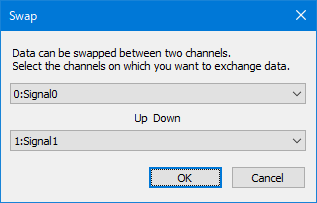
Swap window
You can edit the caret position data by entering [0, 1].
*The operation differs depending on the Insert/Overwrite mode setting.
Copy the selection.
Cut the selection.
Paste the copied data at the caret position.
*The operation differs depending on the Insert/Overwrite mode setting.
Undo the last edit in the graph window.
Redo the edits you canceled with "Undo".
Select "Edit(E)"-"Swap" from the menu, or enter "Ctrl + W" from the keyboard.
Then, a dialog for selecting the channels to swap the data is displayed.
Swap window
Key assignment |
Function |
[0, 1] |
Set the data of the selected position to the specified value |
[0 – 9, A - F] |
Edit the bus data at the selected position and confirm with Enter key |
[Space] |
Toggle the data at the selected position with 0 <-> 1 |
[Delete] |
Delete the selected position data and move the data forward |
[BackSpace] |
Delete the data immediately before the selected position and move the data forward |
[Ctrl + C] |
Copy |
[Ctrl + V] |
Paste |
[Ctrl + X] |
Cut |