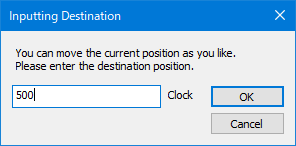
Destination input window
Select "Edit(E)"-"Jump"-"Jump To Specified Clock..." from the menu, or enter "Ctrl + J" from the keyboard.
Then, a dialog for specifying the destination clock is displayed.
Destination input window
Specify the clock and click the "OK" button to display the pattern data at the specified clock position on the graph.
When sampling across multiple files, you can also specify the previous and next files in "destination".
The previous and next files cannot be specified when the file is reopened from the menu or toolbar.