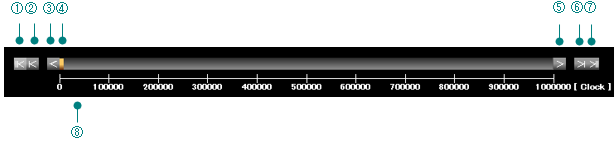
You can scroll the graph in the clock axis direction (horizontal axis) by using the scroll bar displayed at the bottom of the graph.
①⑦
Moves to the first file or the last file when sampling across multiple files by automatic saving.
It cannot be used when the file is reopened from the menu or toolbar.
②⑥
When sampling across multiple files by automatic saving, it moves to the previous file or the next file.
It cannot be used when the file is reopened from the menu or toolbar.
④
The orange scroll bar shows the position and range currently displayed on the graph.
You can change the display position by dragging this bar.
⑧
The scale displayed at the bottom indicates the clock position.
③⑤
The arrows on both ends of the bar are buttons for fine-tuning the position.
You can move
1 clock by "left-clicking"
5 clocks by "Shift + left click"
10 clocks by "Ctrl + left click".
*It keeps moving while the left mouse button is pressed.