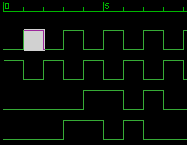
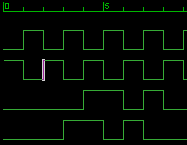
Caret [Overwrite mode] Caret [Insert mode]
Click on the graph window to display the caret at that position.
The caret is displayed differently depending on whether it is in overwrite mode or insert mode.
*The current mode is displayed at the right end of the status bar.
Caret [Overwrite mode] Caret [Insert mode]
Switch the insert/overwrite mode from the menu below.
"Settings(O)"-"Edit Mode"-"Insert" or "Overwrite"
You can also switch with the "Insert" key.
The following shortcuts are defined to move the caret.
Key assignment |
Function |
[→ or ← or ↓ or ↑ ] |
Move the caret in 1-clock unit |
[Home] |
Move to the beginning of the selected channel |
[End] |
Move to the end of the selected channel |
[PageUp] [PageDown] |
Move in 1-page unit (clock axis direction) |
These functions can also be selected from the following items in the menu.
"Edit(E)"-"Jump"