You can save the file by selecting the following menu while the device is stopped.
Menu: "File(F)"-"Save(S)" or "Save As(A)..."
If the data is newly saved, the file save dialog is displayed.
Select the file format from CSV format (file name.csv) or CPB format (file name.cpb).
Settings |
Description |
*.csv |
Save in CSV format. |
*.cpb |
Save in C-LogicDesigner original binary format. |
When saving the file in CSV format, first save the information about the
settings and conditions for data transfer, and then save the created data.
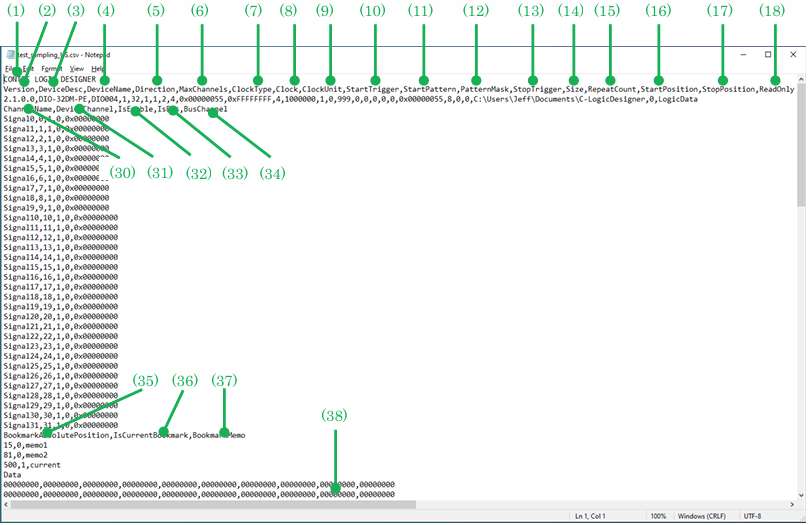
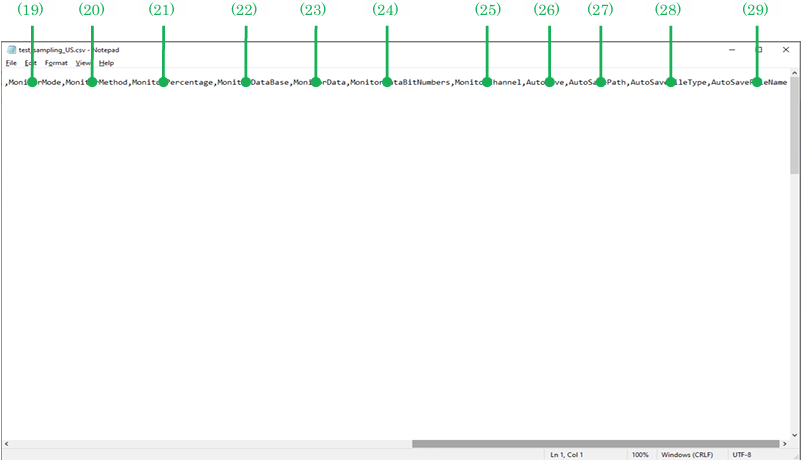
In the figure below, the file saved in CSV format is displayed in Notepad.
The contents for each item are explained below.
No. |
Item |
Description |
1 |
CONTEC LOGIC DESIGNER |
Indicates that the file is a C-LogicDesigner file. |
2 |
Version |
This is the version information of C-LogicDesigner. Used internally by C-LogicDesigner. |
3 |
DeviceDesc |
Saves the model of the device in use. |
4 |
DeviceName |
Saves the device name in use. |
5 |
Direction |
Saves the I/O direction settings. |
6 |
MaxChannels |
Saves the maximum number of channels on the device. |
7 |
ClockType |
Saves the clock type in use as a numerical value. |
8 |
Clock |
Saves the clock value. This value is used when setting the internal clock. |
9 |
ClockUnit |
Saves the unit of the clock value as a numerical value. |
10 |
StartTrigger |
Saves the start condition as a number. |
11 |
StartPattern |
Saves the bit pattern to be compared numerically. |
12 |
PatternMask |
Saves the significant bit mask for the pattern as a number. |
13 |
StopTrigger |
Saves the stop condition numerically. |
14 |
Size |
Saves the buffer size. |
15 |
RepeatCount |
Saves the repeat times. |
16 |
StartPosition |
Saves the transfer start position. |
17 |
StopPosition |
Saves the transfer stop position. |
18 |
ReadOnly |
Saves write-protected attributes as a number. |
19 |
MonitorMode |
Saves the operation mode when a trigger occurs. |
20 |
MonitorMethod |
Saves the trigger pulse data pattern method. |
21 |
MonitorPercentage |
Saves the display ratio after triggering. |
22 |
MonitorDataBase |
Saves the pattern data base. |
23 |
MonitorData |
Saves the bit pattern to compare. |
24 |
MonitorDataBitNumbers |
Saves the number of bits in the data pattern. |
25 |
MonitorChannel |
Saves the starting channel of the data pattern. |
26 |
AutoSave |
Saves the autosave mode. |
27 |
AutoSavePath |
Saves the path of the file to be automatically saved. |
28 |
AutoSaveFileType |
Saves the type of file to be auto-saved. |
29 |
AutoSaveFileName |
Saves the prefix of the file to be auto-saved. |
30 |
ChannelName |
Saves the signal name displayed in the signal name window. |
31 |
DeviceChannel |
Saves the logical channel corresponding to the signal name. |
32 |
IsEnable |
Saves signal enable/disable settings. Used internally by C-LogicDesigner. |
33 |
IsBus |
Saves whether it is a bus signal. |
34 |
BusChannel |
Saves the child signal of the bus signal. |
35 |
BookmarkAbsolutePosition |
Saves the bookmark clock position. |
36 |
IsCurrentBookmark |
Saves whether it is the current bookmark. |
37 |
BookmarkMemo |
Saves bookmark notes. |
38 |
Data |
Saves the pulse pattern data in hexadecimal notation. |