The current bookmark is displayed in pink (
 ).
).Other bookmarks are displayed in yellow (
 ).
).You can mark the selected clock position.
You can also add comments to the bookmarks you have added.
Bookmark the clock position where the caret is located. (Cancel if already set).
The current bookmark is displayed in pink ().
Other bookmarks are displayed in yellow ().
[Toggle Bookmark]
Route |
Operation |
Menu |
[Search(S)]-[Bookmarks]-[Toggle Bookmark] |
Toolbar |
|
Shortcut key |
Ctrl + F2 |
[Clear Bookmarks]
Route |
Operation |
Menu |
[Search(S)]-[Bookmarks]-[Clear Bookmarks] |
Toolbar |
|
[Next Bookmark]
Route |
Operation |
Menu |
[Search(S)]-[Bookmarks]-[Next Bookmark] |
Toolbar |
|
Shortcut key |
F2 |
[Previous Bookmark]
Route |
Operation |
Menu |
[Search(S)]-[Bookmarks]-[Previous Bookmark] |
Toolbar |
|
Shortcut key |
Shift + F2 |
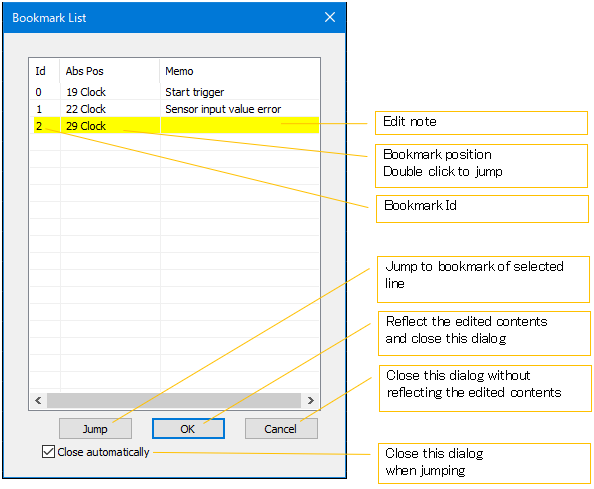
You can display the bookmark list, jump to each bookmark, and write a memo.
[Bookmark List]
Route |
Operation |
Menu |
[Search(S)]-[Bookmarks]-[Bookmark List] |
Toolbar |
|