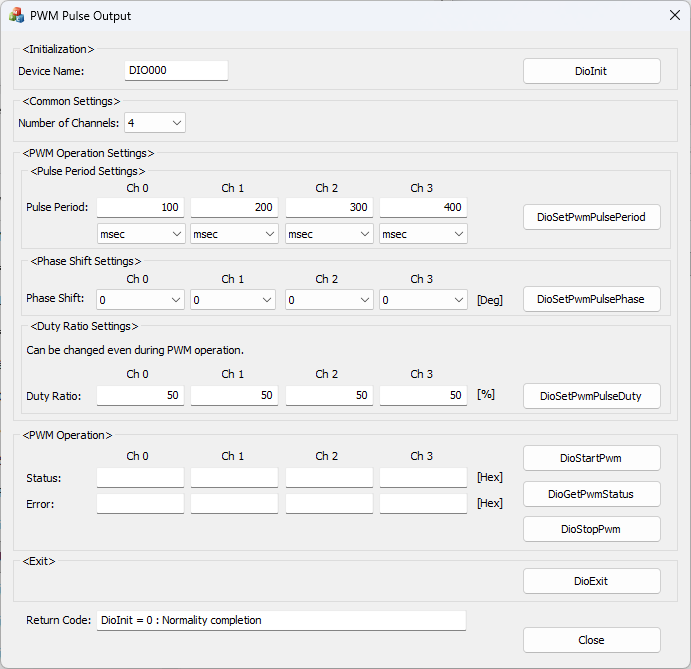
This is a sample that performs PWM output settings, start/stop of output, and status acquisition.
| Sample Specification | |
Program Name |
pwm_output |
Pulse Period |
0ch: 100[msec], 1ch: 200[msec], 2ch: 300[msec], 3ch: 400[msec] |
Duty Ratio |
0ch: 32767, 1ch: 32767, 2ch: 32767, 3ch: 32767 |
Phase Shift |
0ch: 0, 1ch: 0, 2ch: 0, 3ch: 0 |
1. Specify the desired program name, run
the program, and a window that looks like the one above will appear.
Appearance may vary depending on software version.
2. Initialize
・Specify the device name set
in the device manager as the device name, and press the [DioInit] button.
Notifies the device driver to start using the specified
device.
3. Parameter Settings
・Select the desired number of
channels in [Number of Channels:].
・Specify the desired pulse period for each channel in [Pulse
Period:] and press the [DioSetPwmPulsePeriod] button.
・Select the desired phase shift for each channel in [Phase
Shift:] and press the [DioSetPwmPulsePhase] button.
・Enter the desired duty ratio for each channel in [Duty Ratio:]
and press the [DioSetPwmPulseDuty] button.
4. PWM Operation
・Press the [DioStartPwm] button
to start PWM output.
・Press the [DioGetPwmStatus] button to update the display values
of [Status:] and [Error:].
For details on the status content, refer to DioGetPwmStatus.
・Press the [DioStopPwm] button to stop PWM output.
5. Exit
・Press the [DioExit] button to
notify the device driver that the use of the current device is complete.
Start PWM output on a different device (e.g. DIO001,
etc.) without terminating the program.
To start PWM output processing again, specify a new device name and press the [DioInit] button to perform device initialization processing.
6. Processing to terminate the program
・Press the [Close] button in the window to terminate the program.