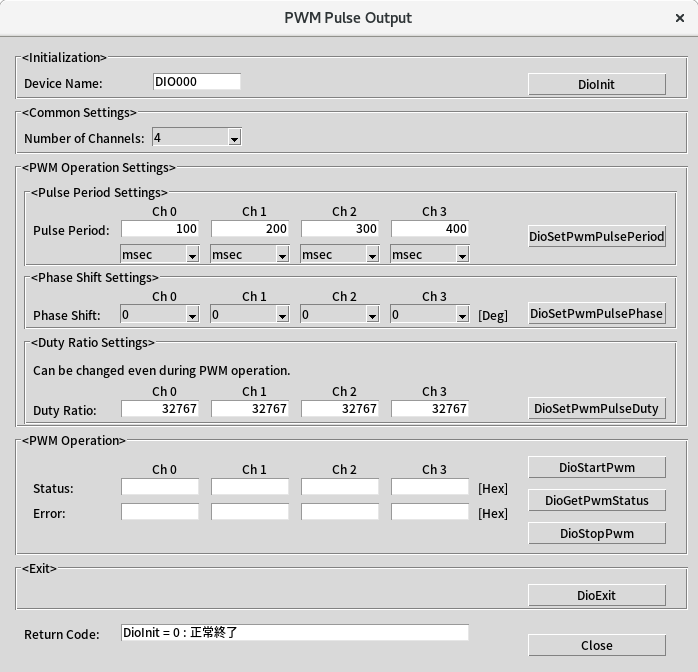
This is a sample that performs PWM output settings, start/stop of output, and status acquisition.
| Sample Specification | |
|
Program Name |
pwm_output |
|
Pulse Period |
0ch: 100[msec], 1ch: 200[msec], 2ch: 300[msec], 3ch: 400[msec] |
|
Duty Ratio |
0ch: 32767, 1ch: 32767, 2ch: 32767, 3ch: 32767 |
|
Phase Shift |
0ch: 0, 1ch: 0, 2ch: 0, 3ch: 0 |
1. Specify the desired program name, run the program, and a window that looks like the one above will appear.
Appearance may vary depending on software version.
2. Initialize
・Specify the device name set in the Configuration Tool into [Device Name], and press the [DioInit] button.
Notifies the device driver to start using the specified device.
3. Parameter Settings
・Select the desired number of channels in [Number of Channels:].
・Specify the desired pulse period for each channel in [Pulse Period:] and press the [DioSetPwmPulsePeriod] button.
・Select the desired phase shift for each channel in [Phase Shift:] and press the [DioSetPwmPulsePhase] button.
・Enter the desired duty ratio for each channel in [Duty Ratio:] and press the [DioSetPwmPulseDuty] button.
4. PWM Operation
・Press the [DioStartPwm] button to start PWM output.
・Press the [DioGetPwmStatus] button to update the display values of [Status:] and [Error:].
For details on the status content, refer to DioGetPwmStatus.
・Press the [DioStopPwm] button to stop PWM output.
5. Exit
・Press the [DioExit] button to notify the device driver that the use of the current device is complete.
Start PWM output on a different device (e.g. DIO001, etc.) without terminating the program.
To start PWM output processing again, specify a new device name and press the [DioInit] button to perform device initialization processing.
6. Processing to terminate the program
・Press the [Close] button in the window to terminate the program.